
Distributor lines
What each client actually has at Pax8 and Sherweb, synced on a schedule or on demand. A distributor price rise is flagged for review instead of eating your margin.
Accord · billing and finance · limited release
Accord is a separate Vigil Glass product for owners. It pulls what each client has at Pax8 and Sherweb, what QuickBooks says was billed and paid, and what Command reports from the endpoints, then shows you where they disagree. Nothing reprices a contract or sends an email until a person approves it.
 Every price change waits for your approval
RECONCILIATION
Most billing leaks are a quantity that drifted: a licence added at the distributor and never billed, a seat removed and still invoiced, a price the distributor raised quietly. Accord lines the sources up so the drift is visible.
What each client actually has at Pax8 and Sherweb, synced on a schedule or on demand. A distributor price rise is flagged for review instead of eating your margin.
What you agreed to bill: quantity times client price on every line. MRR is derived once from those lines and reused everywhere, so there is no second number to drift.
What was invoiced and what was paid, read from QuickBooks Online. Accord never marks anything paid on its own, and it never touches card data.
Each product line is marked matched or not, with the reason. A product with no QuickBooks item goes to the product map so the next month reconciles cleanly.
OWNER VIEW
Accord is staff-only and built for the person who signs the invoices. Technicians never see it, and nothing financial crosses into the service desk.
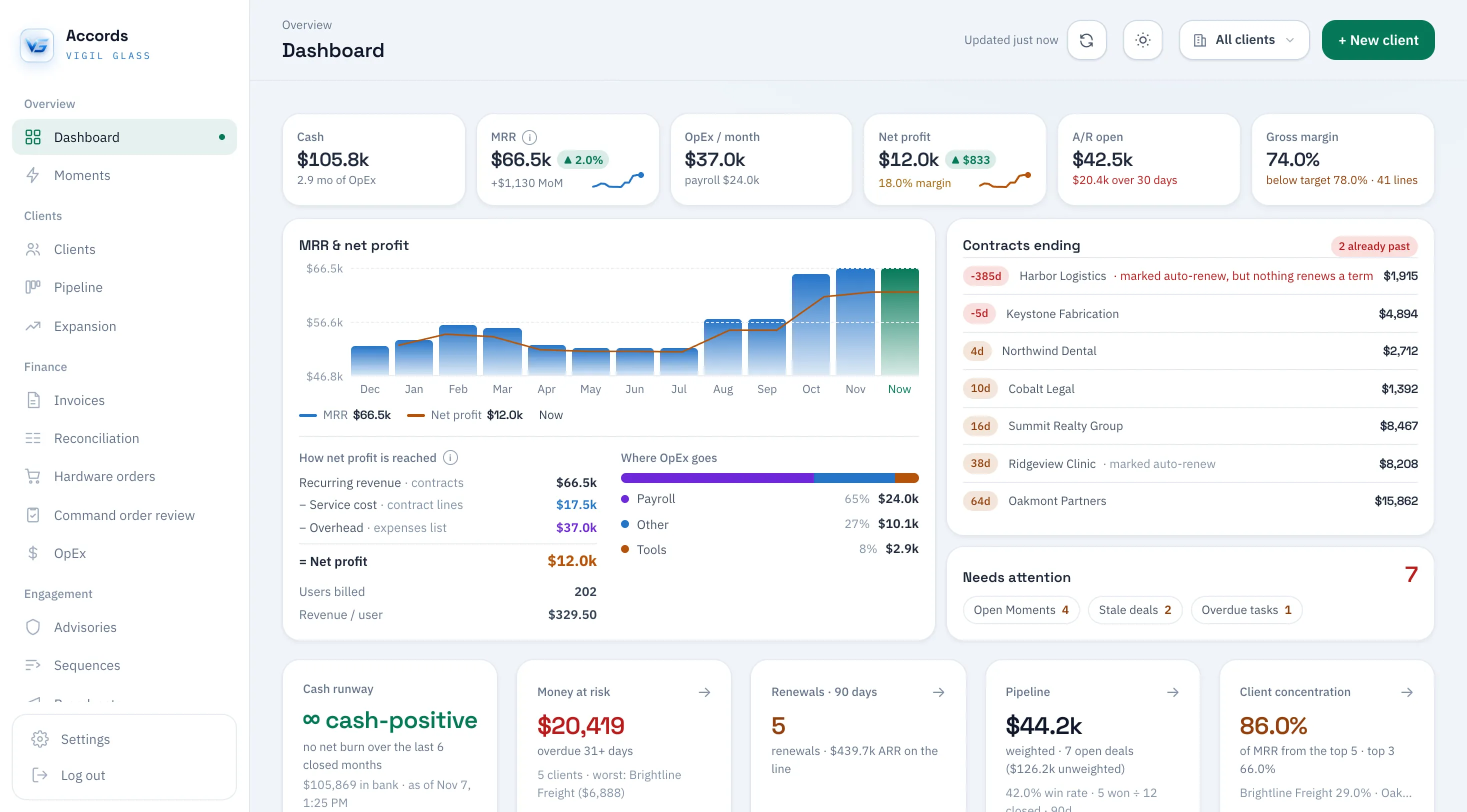
Monthly recurring revenue and net profit over time, with week-over-week and month-over-month change from periodic snapshots.
Gross margin against the catalog target, and where operating expenses go: payroll, tools, insurance, and the rest, normalised to a month.
Outstanding and overdue receivables by age, cash runway, and the clients the book rests on.
Which agreements end in the next 30, 60, and 90 days, which are marked auto-renew, and what each one is worth.
THE ENGINE ARMS, YOU FIRE
Accord watches for conditions worth acting on and turns each one into a moment. A moment is a proposal with a named side effect. It runs only when a person approves it.
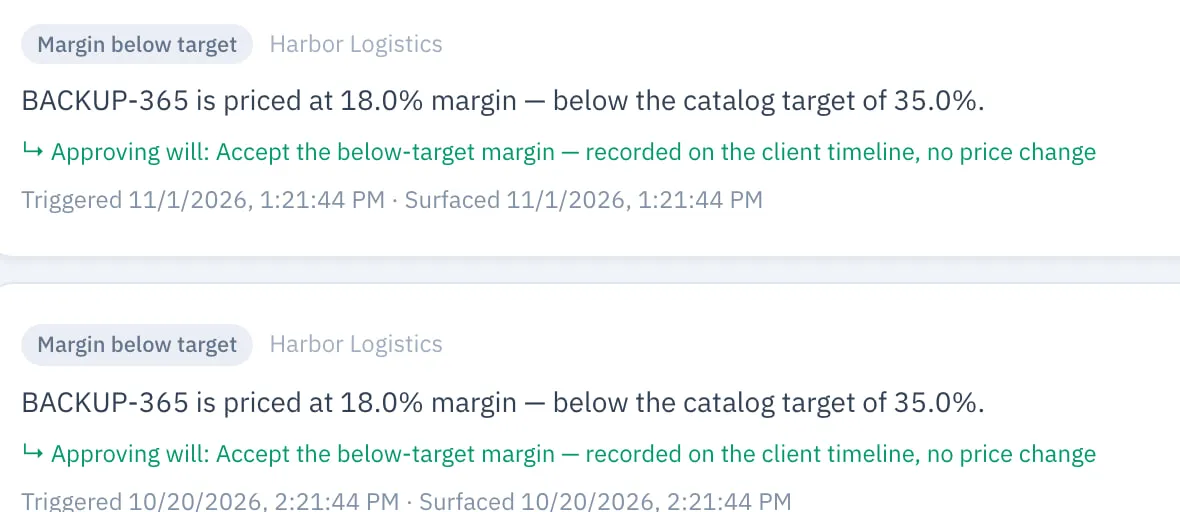
A contract line priced below its catalog target raises a moment. Approving acknowledges it; nothing is repriced automatically.
Every moment states what approving will execute. Dismiss skips it. Either way the decision is recorded.
The client timeline, price-adjustment ledger, and cost snapshots are append-only, so you can see what changed and when.
Advisories and client emails are drafted for review and sent only after approval. There is no automatic send and no automatic reprice.
WITH COMMAND
Accord and Command share one client identity, so what happens on the endpoints can inform billing. The financial data stays in Accord, behind its own sign-in.
Each Accord account maps to a Command tenant. Matching is done once, on the Command matching screen.
Orders captured in Command land in a billing review queue in Accord. Nothing bills until it is approved there.
Metrics Command reports from the endpoints feed the owner dashboard, so the count you bill can be checked against the count you manage.
Owners and managers sign in to Accord. Technicians work in Command. Financial records never enter the service desk.
THE PRODUCT
Real Accord screens, captured in light mode with every client, figure, and date replaced by sample data.
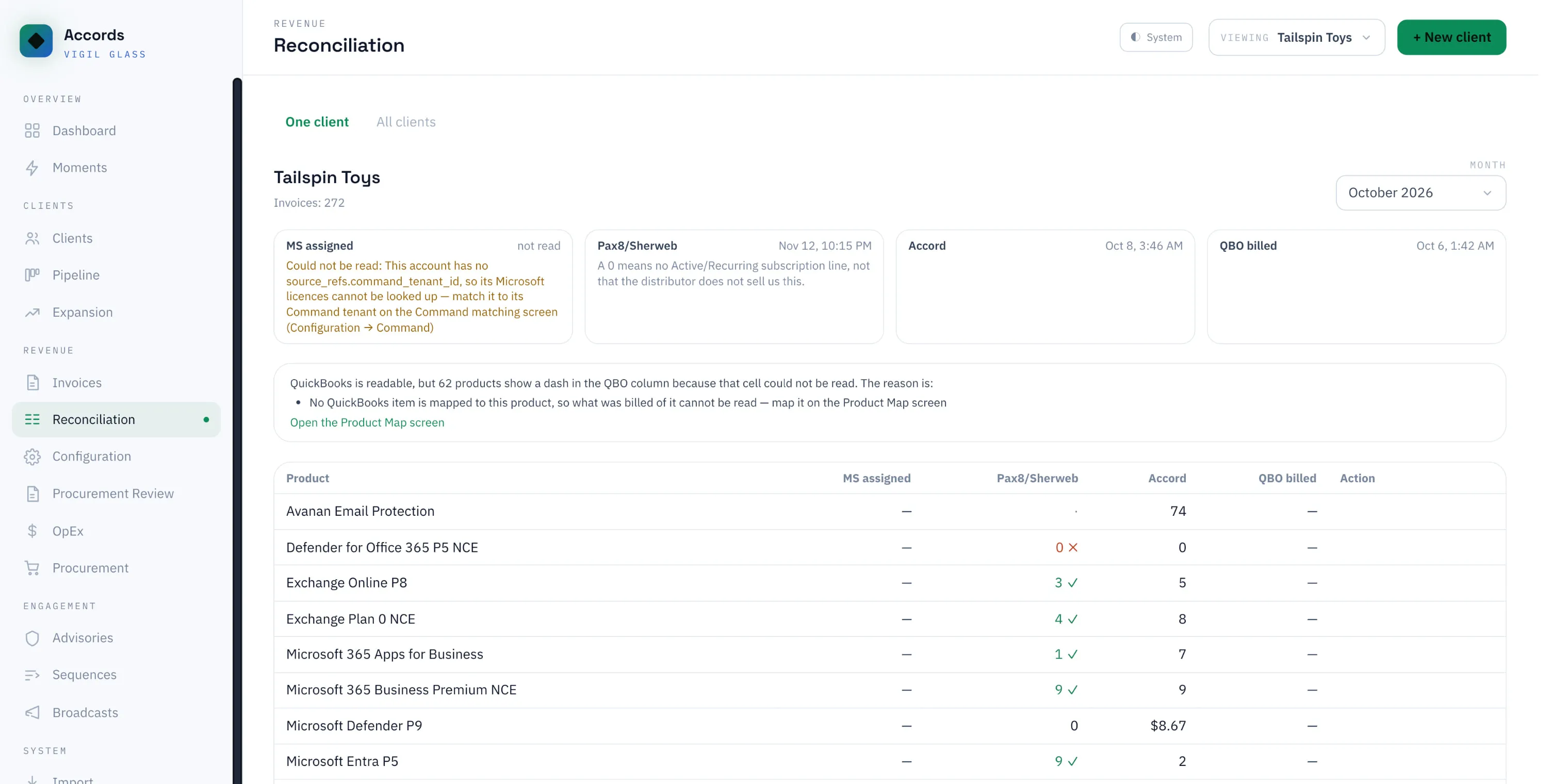
For one client and one month, every product line shows what Microsoft has assigned, what Pax8 or Sherweb billed, what the contract in Accord says, and what QuickBooks invoiced. Mismatches are marked, and products with no QuickBooks item are routed to the product map.
Accord screenshot with sample data. Names and figures are fictional.
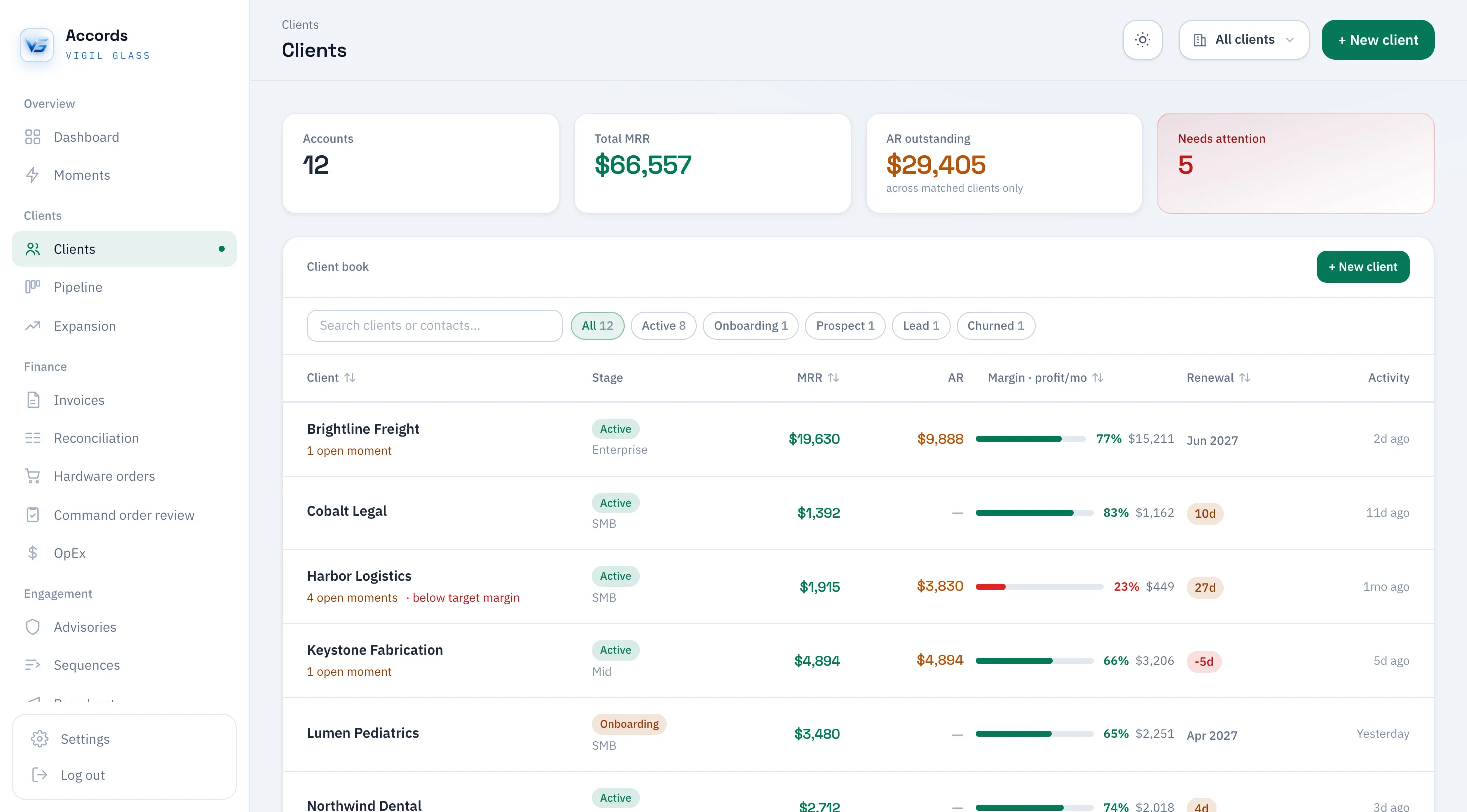
Every client with its stage, MRR, open A/R, margin against the catalog target, and how many proposals are waiting on it. Clients below target margin are called out.
Accord screenshot with sample data. Names and figures are fictional.
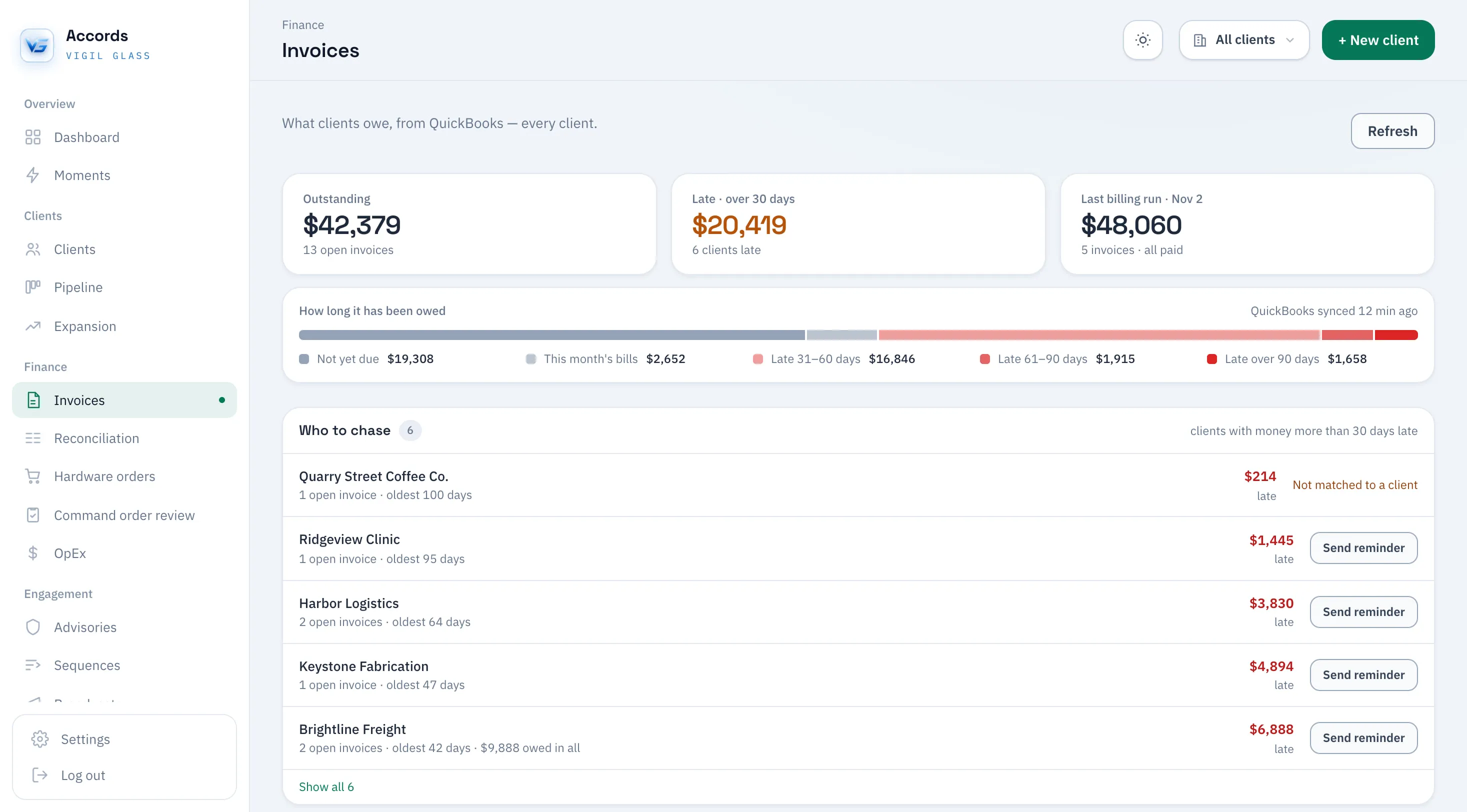
What clients owe, straight from QuickBooks: the outstanding total, what is more than 30 days late, and the last billing run, how long each amount has been owed, and who to chase first, with a reminder button for each client. Invoices that match no client are flagged.
Accord screenshot with sample data. Names and figures are fictional.
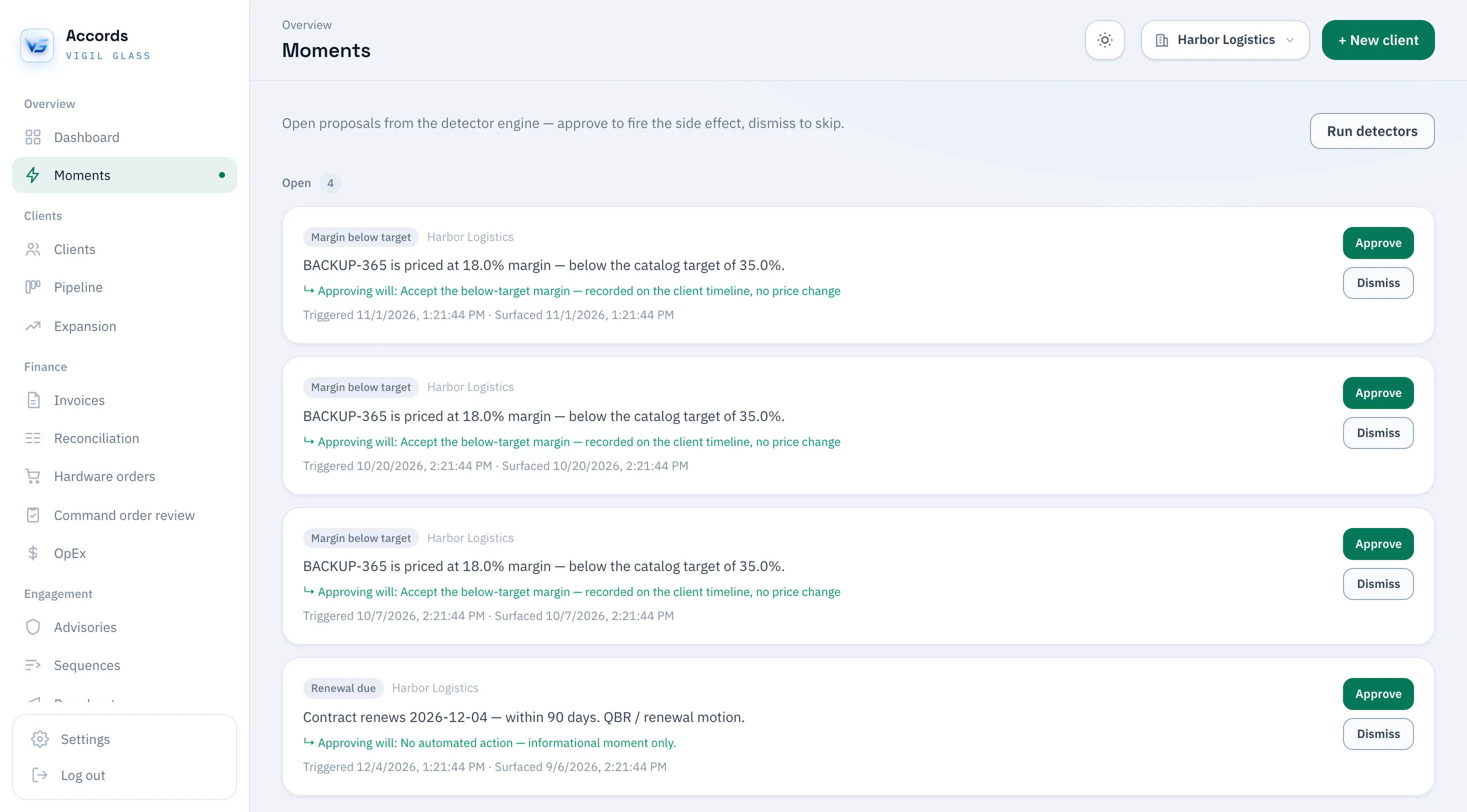
The detector engine proposes; a person decides. A contract line priced below its catalog target becomes a moment with an Approve and a Dismiss button, and the proposal says exactly what approving will do.
Accord screenshot with sample data. Names and figures are fictional.
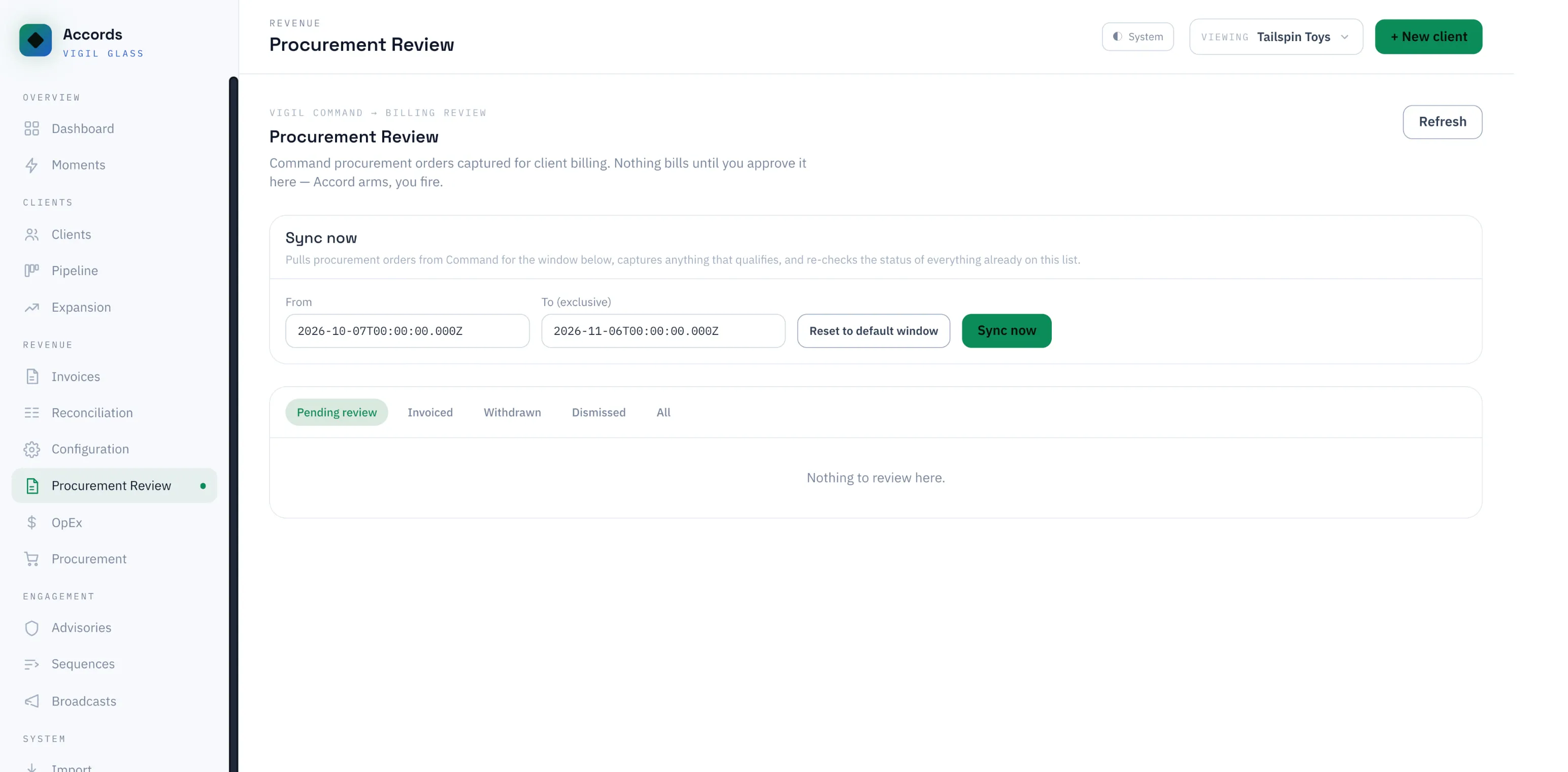
Orders captured in Command land in a billing review queue. Nothing bills until it is approved here.
Accord screenshot with sample data. Names and figures are fictional.
ONE FAMILY
Ticketing, todos, a shared calendar, and a knowledge base. The service-delivery half; Accord is the billing half.
What Command connects to today, including the QuickBooks link that shows clients their invoices.
One price per endpoint for Command. Accord is included for Command founding partners.
Command for technicians, Accord for owners, and what is still in development.
INCLUDED FOR FOUNDING PARTNERS
MSPs accepted as Command founding partners get Accord alongside the free 30-day pilot and the founding rate. Pricing after launch will be published before anything changes.
FAQ
No. Accord is a separate Vigil Glass product with its own sign-in, built for owners and managers. It links to Command for client identity, procurement orders, and endpoint signals, but financial data never enters the service desk.
Pax8 and Sherweb for distributor costs and subscriptions, QuickBooks Online for invoices and payment status, Microsoft for licence assignment, and Command for client matching, procurement, and endpoint signals.
No. QuickBooks is the book of record for payments, and QuickBooks Payments handles cards. Accord never marks an invoice paid on its own and never touches card data.
Yes, in limited release together with Command: MSPs accepted as Command founding partners get both. It already runs the billing and finance of a working MSP. Apply to become a founding partner and choose Accord as an area of interest.
Command founding partners get Accord at no extra charge. Pricing after launch will be published before anything changes.
No. Accord is built for MSPs that invoice from QuickBooks Online. Service delivery lives in Command; billing, reconciliation, and the owner view live in Accord.
Become a Command founding partner and pick Accord as an area of interest, or book a demo for a guided walk through the owner view and the reconciliation screen.